
WATCH DUTY FIRE APP FEATURE DESIGN
APP Design | UI/UX Design | Graphic Design
Inspired by Watch Duty, a real-time wildfire monitoring and emergency alert application, our redesigned app expands core disaster response functions with exclusive new features including a close emergency contact circle and a customizable go-bag checklist to enhance personal crisis preparedness.
My Role
UX Reseracher
UI Designer
Introduce Video Producer
Collaboarators
Semyon
Mariam
Bea Sia
Zynab
Tools
Figma
Adobe Pr
Design Process
Initial Research
We began by researching and analyzing multiple existing applications and brand references, ranging from pet care services to Stone Island’s brand ecosystem. However, we found these topics had overly limited scope to support a complete, impactful project. We then pivoted our focus to the California wildfire crisis, and identified notable gaps and unmet needs within the existing wildfire safety app Watch Duty. This led us to define our core project scope: enhancing Watch Duty with targeted new features to better protect local residents during wildfire emergencies.
User Interview & Insight Gathering
We conducted one-on-one interviews with over 20 users based in California to understand their wildfire preparedness behaviors and pain points. Key findings included:
-
15 out of 20 users had never downloaded any wildfire safety mobile application
-
18 users lacked a pre-prepared emergency evacuation or shelter plan
-
5 users did not have saved up-to-date emergency contact information for their household members
-
16 users expressed major anxiety and uncertainty about their family’s safety during an active wildfire event
Interface Sketching & Design Iteration
Based on our user research conclusions, we moved into the design phase. We created hand-drawn wireframe sketches first, then built detailed Figma mockups to establish the full app architecture, layout logic, and user flow for our newly designed supplementary features.
Prototype & User Testing
We refined our full-function interactive mockups, then conducted live usability testing sessions with our target users. We walked testers through our new feature designs, collected direct feedback on usability, clarity, and real-world practicality, and iterated our design based on their input.
Final Introduction Video
In the final stage of the project, we finalized the complete webpage and interactive showcase, and produced a polished introduction and promotional video that demonstrates our upgraded app functions, design solutions, and real-life wildfire safety value.
Why choose Watch Duty?
We synthesized all findings from our user research to create purpose-built solutions that directly address every identified user pain point.
Interview
Qualitative UX Research | Task-Based Usability Testing
Moving beyond simple yes-or-no questioning, our user research adopted a task-based usability testing approach. We invited over 20 participants to complete guided, 5-minute hands-on sessions directly within the Watch Duty app, assigning practical real-world tasks such as updating their residential location and walking through a wildfire emergency simulation drill. Throughout each session, we closely observed, tracked, and documented the full end-to-end user journey, noting pain points, points of confusion, unmet usability needs, and natural behavioural patterns as users navigated the platform.
Takeaways
User Confusion Under High Pressure
Most users became disoriented while interacting with the app, and doubted they could stay calm and complete critical steps during a real wildfire event.
Zero Fire Safety App Background
Several participants were complete first-time users, with no prior familiarity navigating any emergency or wildfire response platform.
UI Interface Doubt & Skepticism
A subset of users questioned the intuitiveness, clarity, and dependability of the application’s existing user interface design.
Unwillingness To Prepare For Evacuation
Many users chose not to conduct evacuation practice, because they did not feel personally at risk from nearby wildfire hazards.
Primary Goal
Empowering people to protect themselves and others in the event of system failure.
An interconnected system of functions that can transform how users prepare, respond, and reconnect in wildfire emergencies.
Customer Journey


NEW FEATURES
Define New Functionality
We synthesized all findings from our user research to create purpose-built solutions that directly address every identified user pain point.
New Feature Suite
-
Onboarding: Streamlined first-time setup + instant wildfire event early warning system
-
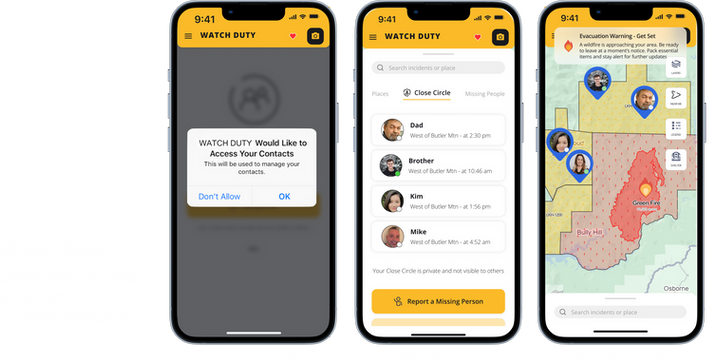
Close Circle: Personal safety group for fast emergency alert sharing with family & contacts
-
Community Reporting: Crowdsourced, verified local wildfire situation updates
-
Go-Bag Checklist: Pre-made customizable emergency evacuation supply checklist
-
Evacuation Mode: Interactive guided evacuation practice and real emergency response guidance
New Feature : Onboarding

New Feature : Close Circle
New Feature : Go-Bag Checklist

New Feature : Practice Mode

New Feature : Community Report

New Feature : Small Home Widget

